Correction CCNA Version 7

Correction CCNA Version 7

Correction CCNA 1

Correction CCNA 1

Cisco - CCNA version 6 Answes

Cisco - CCNA 4 version 6 Answe

Correction CCNA 3

Correction CCNA 2

CCNA 1 version 7 Modules 4 – 7: Ethernet Concepts Exam Answers 2020


1. What action will occur if a switch receives a frame with the destination MAC address FF:FF:FF:FF:FF:FF?
  • The switch forwards it out all ports except the ingress port.
  • The switch refreshes the timer on that entry.
  • The switch does not forward the frame.
  • The switch sends the frame to a connected router because the destination MAC address is not local.

2. Why are two strands of fiber used for a single fiber optic connection?
  • The two strands allow the data to travel for longer distances without degrading.
  • They prevent crosstalk from causing interference on the connection.
  • They increase the speed at which the data can travel.
  • They allow for full-duplex connectivity.
3. Which characteristic describes crosstalk?
  • the distortion of the network signal from fluorescent lighting
  • the distortion of the transmitted messages from signals carried in adjacent wires
  • the weakening of the network signal over long cable lengths
  • the loss of wireless signal over excessive distance from the access point
4. Which procedure is used to reduce the effect of crosstalk in copper cables?
  • requiring proper grounding connections
  • twisting opposing circuit wire pairs together
  • wrapping the bundle of wires with metallic shielding
  • designing a cable infrastructure to avoid crosstalk interference
  • avoiding sharp bends during installation
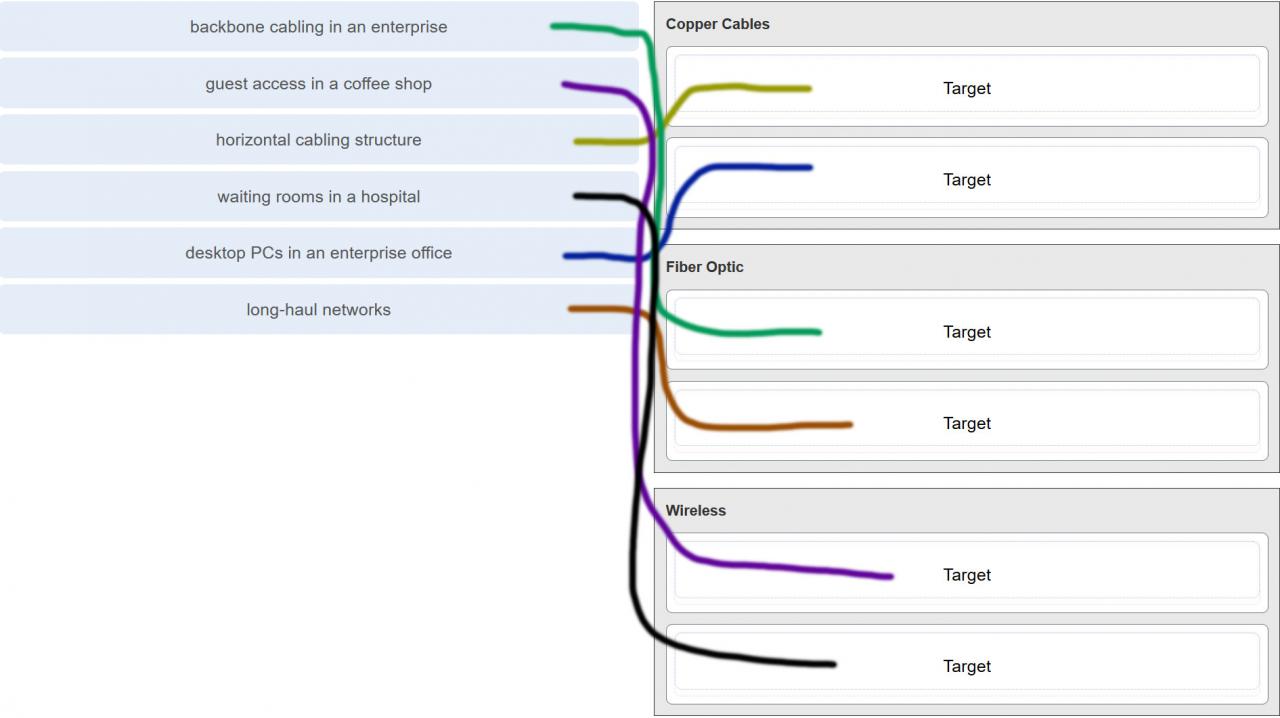
5. Match the situation with the appropriate use of network media.

6. A network administrator is measuring the transfer of bits across the company backbone for a mission critical financial application. The administrator notices that the network throughput appears lower than the bandwidth expected. Which three factors could influence the differences in throughput? (Choose three.)
  • the amount of traffic that is currently crossing the network
  • the sophistication of the encapsulation method applied to the data
  • the type of traffic that is crossing the network
  • the latency that is created by the number of network devices that the data is crossing
  • the bandwidth of the WAN connection to the Internet
  • the reliability of the gigabit Ethernet infrastructure of the backbone
7. What are two characteristics of fiber-optic cable? (Choose two.)
  • It is not affected by EMI or RFI.
  • Each pair of cables is wrapped in metallic foil.
  • It combines the technique of cancellation, shielding, and twisting to protect data.
  • It typically contains 4 pairs of fiber-optic wires.
  • It is more expensive than UTP cabling is.
8. What is a primary role of the Physical layer in transmitting data on the network?
  • create the signals that represent the bits in each frame on to the media
  • provide physical addressing to the devices
  • determine the path packets take through the network
  • control data access to the media
Explanation: The OSI physical layer provides the means to transport the bits that make up a frame across the network media. This layer accepts a complete frame from the data link layer and encodes it as a series of signals that are transmitted to the local media.
9. With the use of unshielded twisted-pair copper wire in a network, what causes crosstalk within the cable pairs?
  • the magnetic field around the adjacent pairs of wire
  • the use of braided wire to shield the adjacent wire pairs
  • the reflection of the electrical wave back from the far end of the cable
  • the collision caused by two nodes trying to use the media simultaneously
Explanation: Crosstalk is a type of noise, or interference that occurs when signal transmission on one wire interferes with another wire. When current flows through a wire a magnetic field is produced. The produced magnetic field will interface the signal carried in the adjacent wire.
10. Refer to the graphic. What type of cabling is shown?

  • STP
  • UTP
  • coax
  • fiber
Explanation: Network cabling include different types of cables:
  • UTP cable consists of four pairs of color-coded wires that have been twisted together and then encased in a flexible plastic sheath.
  • STP cable uses four pairs of wires, each wrapped in a foil shield, which are then wrapped in an overall metallic braid or foil.
  • Coaxial cable uses a copper conductor and a layer of flexible plastic insulation surrounds the copper conductor.
  • Fiber cable is a flexible, extremely thin, transparent strand of glass surrounded by plastic insulation.
11. In addition to the cable length, what two factors could interfere with the communication carried over UTP cables? (Choose two.)
  • crosstalk
  • bandwidth
  • size of the network
  • signal modulation technique
  • electromagnetic interference
Explanation: Copper media is widely used in network communications. However, copper media is limited by distance and signal interference. Data is transmitted on copper cables as electrical pulses. The electrical pulses are susceptible to interference from two sources:
  • Electromagnetic interference (EMI) or radio frequency interference (RFI) – EMI and RFI signals can distort and corrupt the data signals being carried by copper media.
  • Crosstalk – Crosstalk is a disturbance caused by the electric or magnetic fields of a signal on one wire interfering with the signal in an adjacent wire.
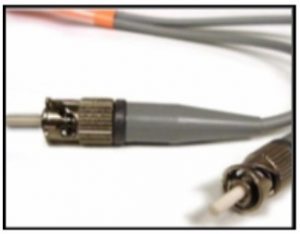
12. Refer to the graphic. What type of cabling is shown?

  • STP
  • UTP
  • coax
  • fiber
13. Which two devices commonly affect wireless networks? (Choose two.)
  • Blu-ray players
  • home theaters
  • cordless phones
  • microwaves
  • incandescent light bulbs
  • external hard drives
Explanation: Radio Frequency Interference (RFI) is the interference that is caused by radio transmitters and other devices that are transmitting in the same frequency.
14. Which two statements describe the services provided by the data link layer? (Choose two.)
  • It defines the end-to-end delivery addressing scheme.
  • It maintains the path between the source and destination devices during the data transmission.
  • It manages the access of frames to the network media.
  • It provides reliable delivery through link establishment and flow control.
  • It ensures that application data will be transmitted according to the prioritization.
  • It packages various Layer 3 PDUs into a frame format that is compatible with the network interface.
Explanation: The data link layer is divided into two sub layers, namely Logical Link Control (LLC) and Media Access Control (MAC). LLC forms a frame from the network layer PDU into a format that conforms to the requirements of the network interface and media. A network layer PDU might be for IPv4 or IPv6. The MAC sub layer defines the media access processes performed by the hardware. It manages the frame access to the network media according to the physical signaling requirements (copper cable, fiber optic, wireless, etc.)
15. What is the function of the CRC value that is found in the FCS field of a frame?
  • to verify the integrity of the received frame
  • to verify the physical address in the frame
  • to verify the logical address in the frame
  • to compute the checksum header for the data field in the frame
16. What is contained in the trailer of a data-link frame?
  • logical address
  • physical address
  • data
  • error detection
17. Which statement describes a characteristic of the frame header fields of the data link layer?
  • They all include the flow control and logical connection fields.
  • Ethernet frame header fields contain Layer 3 source and destination addresses.
  • They vary depending on protocols.
  • They include information on user applications.
Explanation: All data link layer protocols encapsulate the Layer 3 PDU within the data field of the frame. However, the structure of the frame and the fields that are contained in the header vary according to the protocol. Different data link layer protocols may use different fields, like priority/quality of service, logical connection control, physical link control, flow control, and congestion control.
18. A network team is comparing physical WAN topologies for connecting remote sites to a headquarters building. Which topology provides high availability and connects some, but not all, remote sites?
  • mesh
  • partial mesh
  • hub and spoke
  • point-to-point
Explanation: Partial mesh topologies provide high availability by interconnecting multiple remote sites, but do not require a connection between all remote sites. A mesh topology requires point-to-point links with every system being connected to every other system. A point-to-point topology is where each device is connected to one other device. A hub and spoke uses a central device in a star topology that connects to other point-to-point devices.
19. Which two fields or features does Ethernet examine to determine if a received frame is passed to the data link layer or discarded by the NIC? (Choose two.)
  • auto-MDIX
  • CEF
  • Frame Check Sequence
  • minimum frame size
  • source MAC address
20. Which media communication type does not require media arbitration in the data link layer?
  • deterministic
  • half-duplex
  • full-duplex
  • controlled access
Explanation: Half-duplex communication occurs when both devices can both transmit and receive on the medium but cannot do so simultaneously. Full-duplex communication occurs when both devices can transmit and receive on the medium at the same time and therefore does not require media arbitration. Half-duplex communication is typically contention-based, whereas controlled (deterministic) access is applied in technologies where devices take turns to access the medium.
21. Which statement describes an extended star topology?
  • End devices connect to a central intermediate device, which in turn connects to other central intermediate devices.
  • End devices are connected together by a bus and each bus connects to a central intermediate device.
  • Each end system is connected to its respective neighbor via an intermediate device.
  • All end and intermediate devices are connected in a chain to each other.
Explanation: In an extended star topology, central intermediate devices interconnect other star topologies.
22. What is a characteristic of the LLC sublayer?
  • It provides the logical addressing required that identifies the device.
  • It provides delimitation of data according to the physical signaling requirements of the medium.
  • It places information in the frame allowing multiple Layer 3 protocols to use the same network interface and media.
  • It defines software processes that provide services to the physical layer.
23. What are three ways that media access control is used in networking? (Choose three.)
  • Ethernet utilizes CSMA/CD.
  • Media access control provides placement of data frames onto the media.
  • Contention-based access is also known as deterministic.
  • 802.11 utilizes CSMA/CD.
  • Data link layer protocols define the rules for access to different media.
  • Networks with controlled access have reduced performance due to data collisions.
24. During the encapsulation process, what occurs at the data link layer for a PC connected to an Ethernet network?
  • An IP address is added.
  • The logical address is added.
  • The physical address is added.
  • The process port number is added.
Explanation: The Ethernet frame includes the source and destination physical address. The trailer includes a CRC value in the Frame Check Sequence field to allow the receiving device to determine if the frame has been changed (has errors) during the transmission.
25. What three items are contained in an Ethernet header and trailer? (Choose three.)
  • source IP address
  • source MAC address
  • destination IP address
  • destination MAC address
  • error-checking information
Explanation: Layer 2 headers contain the following:
  • Frame start and stop indicator flags at the beginning and end of a frame
  • Addressing – for Ethernet networks this part of the header contains source and destination MAC addresses
  • Type field to indicate what Layer 3 protocol is being used
  • Error detection to determine if the frame arrived without error
26. What type of communication rule would best describe CSMA/CD?
  • access method
  • flow control
  • message encapsulation
  • message encoding
Explanation: Carrier sense multiple access collision detection (CSMA/CD) is the access method used with Ethernet. The access method rule of communication dictates how a network device is able to place a signal on the carrier. CSMA/CD dictates those rules on an Ethernet network and CSMA/CA dictates those rules on an 802.11 wireless LAN.
27. Which three basic parts are common to all frame types supported by the data link layer? (Choose three.)
  • header
  • type field
  • MTU size
  • data
  • trailer
  • CRC value
Explanation: The data link protocol is responsible for NIC-to-NIC communications within the same network. Although there are many different data link layer protocols that describe data link layer frames, each frame type has three basic parts:
  • Header
  • Data
  • Trailer
28. Which statement is true about the CSMA/CD access method that is used in Ethernet?
  • When a device hears a carrier signal and transmits, a collision cannot occur.
  • A jamming signal causes only devices that caused the collision to execute a backoff algorithm.
  • All network devices must listen before transmitting.
  • Devices involved in a collision get priority to transmit after the backoff period.
29. What is the auto-MDIX feature on a switch?
  • the automatic configuration of an interface for 10/100/1000 Mb/s operation
  • the automatic configuration of an interface for a straight-through or a crossover Ethernet cable connection
  • the automatic configuration of full-duplex operation over a single Ethernet copper or optical cable
  • the ability to turn a switch interface on or off accordingly if an active connection is detected
Explanation: The auto-MDIX enables a switch to use a crossover or a straight-through Ethernet cable to connect to a device regardless of the device on the other end of the connection.
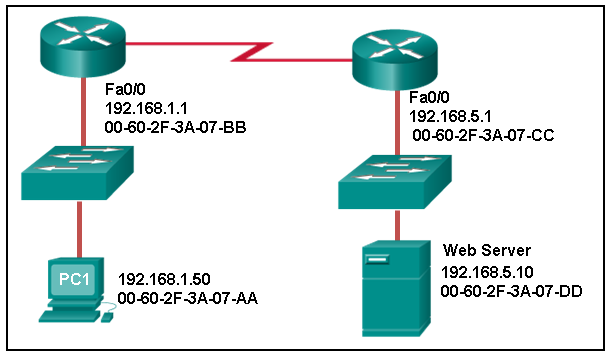
30. Refer to the exhibit. What is the destination MAC address of the Ethernet frame as it leaves the web server if the final destination is PC1?

  • 00-60-2F-3A-07-AA
  • 00-60-2F-3A-07-BB
  • 00-60-2F-3A-07-CC
  • 00-60-2F-3A-07-DD
Explanation: The destination MAC address is used for local delivery of Ethernet frames. The MAC (Layer 2) address changes at each network segment along the path. As the frame leaves the web server, it will be delivered by using the MAC address of the default gateway.
31. A Layer 2 switch is used to switch incoming frames from a 1000BASE-T port to a port connected to a 100Base-T network. Which method of memory buffering would work best for this task?
  • port-based buffering
  • level 1 cache buffering
  • shared memory buffering
  • fixed configuration buffering
32. What are two examples of the cut-through switching method? (Choose two.)
  • store-and-forward switching
  • fast-forward switching
  • CRC switching
  • fragment-free switching
  • QOS switching
33. Which frame forwarding method receives the entire frame and performs a CRC check to detect errors before forwarding the frame?
  • cut-through switching
  • store-and-forward switching
  • fragment-free switching
  • fast-forward switching
Explanation: Fast-forward and fragment-free switching are variations of cut-through switching, which begins to forward the frame before the entire frame is received.
34. What is the purpose of the FCS field in a frame?
  • to obtain the MAC address of the sending node
  • to verify the logical address of the sending node
  • to compute the CRC header for the data field
  • to determine if errors occurred in the transmission and reception
Explanation: The FCS field in a frame is used to detect any errors in the transmission and receipt of a frame. This is done by comparing the CRC value within the frame against a computed CRC value of the frame. If the two values do not match, then the frame is discarded.
35. Which switching method has the lowest level of latency?
  • cut-through
  • store-and-forward
  • fragment-free
  • fast-forward
Explanation: Fast-forward switching begins to forward a frame after reading the destination MAC address, resulting in the lowest latency. Fragment-free reads the first 64 bytes before forwarding. Store-and-forward has the highest latency because it reads the entire frame before beginning to forward it. Both fragment-free and fast-forward are types of cut-through switching.
36. A network administrator is connecting two modern switches using a straight-through cable. The switches are new and have never been configured. Which three statements are correct about the final result of the connection? (Choose three.)
  • The link between the switches will work at the fastest speed that is supported by both switches.
  • The link between switches will work as full-duplex.
  • If both switches support different speeds, they will each work at their own fastest speed.
  • The auto-MDIX feature will configure the interfaces eliminating the need for a crossover cable.
  • The connection will not be possible unless the administrator changes the cable to a crossover cable.
  • The duplex capability has to be manually configured because it cannot be negotiated.
Explanation: Modern switches can negotiate to work in full-duplex mode if both switches are capable. They will negotiate to work using the fastest possible speed and the auto-MDIX feature is enabled by default, so a cable change is not needed.
37. Which advantage does the store-and-forward switching method have compared with the cut-through switching method?
  • collision detecting
  • frame error checking
  • faster frame forwarding
  • frame forwarding using IPv4 Layer 3 and 4 information
Explanation: A switch using the store-and-forward switching method performs an error check on an incoming frame by comparing the FCS value against its own FCS calculations after the entire frame is received. In comparison, a switch using the cut-through switching method makes quick forwarding decisions and starts the forwarding process without waiting for the entire frame to be received. Thus a switch using cut-through switching may send invalid frames to the network. The performance of store-and-forward switching is slower compared to cut-through switching performance. Collision detection is monitored by the sending device. Store-and-forward switching does not use IPv4 Layer 3 and 4 information for its forwarding decisions.
38. When the store-and-forward method of switching is in use, what part of the Ethernet frame is used to perform an error check?
  • CRC in the trailer
  • source MAC address in the header
  • destination MAC address in the header
  • protocol type in the header
39. Which switching method uses the CRC value in a frame?
  • cut-through
  • fast-forward
  • fragment-free
  • store-and-forward
Explanation: When the store-and-forward switching method is used, the switch receives the complete frame before forwarding it on to the destination. The cyclic redundancy check (CRC) part of the trailer is used to determine if the frame has been modified during transit.​​ In contrast, a cut-through switch forwards the frame once the destination Layer 2 address is read. Two types of cut-through switching methods are fast-forward and fragment-free.
40. What are two actions performed by a Cisco switch? (Choose two.)
  • building a routing table that is based on the first IP address in the frame header
  • using the source MAC addresses of frames to build and maintain a MAC address table
  • forwarding frames with unknown destination IP addresses to the default gateway
  • utilizing the MAC address table to forward frames via the destination MAC address
  • examining the destination MAC address to add new entries to the MAC address table
Explanation: Important actions that a switch performs are as follows:
  • When a frame comes in, the switch examines the Layer 2 source address to build and maintain the Layer 2 MAC address table.
  • It examines the Layer 2 destination address to determine how to forward the frame. When the destination address is in the MAC address table, then the frame is sent out a particular port. When the address is unknown, the frame is sent to all ports that have devices connected to that network.
41. Which two statements describe features or functions of the logical link control sublayer in Ethernet standards? (Choose two.)
  • Logical link control is implemented in software.
  • Logical link control is specified in the IEEE 802.3 standard.
  • The LLC sublayer adds a header and a trailer to the data.
  • The data link layer uses LLC to communicate with the upper layers of the protocol suite.
  • The LLC sublayer is responsible for the placement and retrieval of frames on and off the media.
Explanation: Logical link control is implemented in software and enables the data link layer to communicate with the upper layers of the protocol suite. Logical link control is specified in the IEEE 802.2 standard. IEEE 802.3 is a suite of standards that define the different Ethernet types. The MAC (Media Access Control) sublayer is responsible for the placement and retrieval of frames on and off the media. The MAC sublayer is also responsible for adding a header and a trailer to the network layer protocol data unit (PDU).
42. What is the auto-MDIX feature?
  • It enables a device to automatically configure an interface to use a straight-through or a crossover cable.
  • It enables a device to automatically configure the duplex settings of a segment.
  • It enables a device to automatically configure the speed of its interface.
  • It enables a switch to dynamically select the forwarding method.
43. What is one advantage of using the cut-through switching method instead of the store-and-forward switching method?
  • has a positive impact on bandwidth by dropping most of the invalid frames
  • makes a fast forwarding decision based on the source MAC address of the frame
  • has a lower latency appropriate for high-performance computing applications​
  • provides the flexibility to support any mix of Ethernet speeds
Explanation: Cut-through switching provides lower latency switching for high-performance computing (HPC) applications. Cut-through switching allows more invalid frames to cross the network than store-and-forward switching. The cut-through switching method can make a forwarding decision as soon as it looks up the destination MAC address of the frame.
44. Which is a multicast MAC address?
  • FF-FF-FF-FF-FF-FF
  • 5C-26-0A-4B-19-3E
  • 01-00-5E-00-00-03
  • 00-26-0F-4B-00-3E
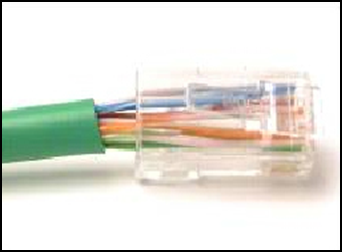
45. Refer to the exhibit. What is wrong with the displayed termination?

  • The woven copper braid should not have been removed.
  • The wrong type of connector is being used.
  • The untwisted length of each wire is too long.
  • The wires are too thick for the connector that is used.
Explanation: When a cable to an RJ-45 connector is terminated, it is important to ensure that the untwisted wires are not too long and that the flexible plastic sheath surrounding the wires is crimped down and not the bare wires. None of the colored wires should be visible from the bottom of the jack.
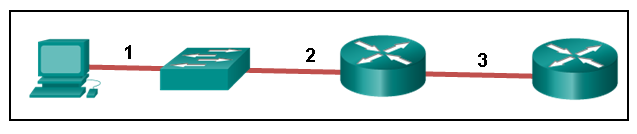
46. Refer to the exhibit. The PC is connected to the console port of the switch. All the other connections are made through FastEthernet links. Which types of UTP cables can be used to connect the devices?​

  • 1 – rollover, 2 – crossover, 3 – straight-through
  • 1 – rollover, 2 – straight-through, 3 – crossover
  • 1 – crossover, 2 – straight-through, 3 – rollover
  • 1 – crossover, 2 – rollover, 3 – straight-through
Explanation: A straight-through cable is commonly used to interconnect a host to a switch and a switch to a router. A crossover cable is used to interconnect similar devices together like switch to a switch, a host to a host, or a router to a router. If a switch has the MDIX capability, a crossover could be used to connect the switch to the router; however, that option is not available. A rollover cable is used to connect to a router or switch console port.
47. Open the PT Activity. Perform the tasks in the activity instructions and then answer the question.
Which port does Switch0 use to send frames to the host with the IPv4 address 10.1.1.5?
  • Fa0/1
  • Fa0/5
  • Fa0/9
  • Fa0/11
Explanation: Issuing the command ipconfig /all from the PC0 command prompt displays the IPv4 address and MAC address. When the IPv4 address 10.1.1.5 is pinged from PC0, the switch stores the source MAC address (from PC0) along with the port to which PC0 is connected. When the destination reply is received, the switch takes the destination MAC address and compares to MAC addresses stored in the MAC address table. Issuing the show mac-address-table on the PC0 Terminal application displays two dynamic MAC address entries. The MAC address and port entry that does not belong to PC0 must be the MAC address and port of the destination with the IPv4 address 10.1.1.5.
48. What does the term “attenuation” mean in data communication?
  • loss of signal strength as distance increases
  • time for a signal to reach its destination
  • leakage of signals from one cable pair to another
  • strengthening of a signal by a networking device
Explanation: Data is transmitted on copper cables as electrical pulses. A detector in the network interface of a destination device must receive a signal that can be successfully decoded to match the signal sent. However, the farther the signal travels, the more it deteriorates. This is referred to as signal attenuation.
49. What makes fiber preferable to copper cabling for interconnecting buildings? (Choose three.)
  • greater distances per cable run
  • lower installation cost
  • limited susceptibility to EMI/RFI
  • durable connections
  • greater bandwidth potential
  • easily terminated
Explanation: Optical fiber cable transmits data over longer distances and at higher bandwidths than any other networking media. Unlike copper wires, fiber-optic cable can transmit signals with less attenuation and is completely immune to EMI and RFI.
50. What OSI physical layer term describes the process by which one wave modifies another wave?
  • modulation
  • IEEE
  • EIA/TIA
  • air
51. What OSI physical layer term describes the capacity at which a medium can carry data?
  • bandwidth
  • IEEE
  • EIA/TIA
  • air
52. What OSI physical layer term describes the capacity at which a medium can carry data?
  • bandwidth
  • throughput
  • latency
  • goodput
53. What OSI physical layer term describes the measure of the transfer of bits across a medium over a given period of time?
  • throughput
  • bandwidth
  • latency
  • goodput
54. What OSI physical layer term describes the amount of time, including delays, for data to travel from one point to another?
  • latency
  • bandwidth
  • throughput
  • goodput
55. What OSI physical layer term describes the amount of time, including delays, for data to travel from one point to another?
  • latency
  • fiber-optic cable
  • air
  • copper cable
56. What OSI physical layer term describes the measure of usable data transferred over a given period of time?
  • goodput
  • fiber-optic cable
  • air
  • copper cable
57. What OSI physical layer term describes the physical medium which uses electrical pulses?
  • copper cable
  • fiber-optic cable
  • air
  • goodput
58. What OSI physical layer term describes the physical medium that uses the propagation of light?
  • fiber-optic cable
  • goodput
  • latency
  • throughput
59. What OSI physical layer term describes the physical medium for microwave transmissions?
  • air
  • goodput
  • latency
  • throughput
60. Which two functions are performed at the MAC sublayer of the OSI data link layer? (Choose two.)
  • Implements a trailer to detect transmission errors.
  • Controls the NIC responsible for sending and receiving data on the physical medium.
  • Places information in the frame that identifies which network layer protocol is being used for the frame.
  • Adds Layer 2 control information to network protocol data.
  • Enables IPv4 and IPv6 to utilize the same network interface and media.
61. Which two functions are performed at the LLC sublayer of the OSI data link layer? (Choose two.)
  • Enables IPv4 and IPv6 to utilize the same network interface and media.
  • Places information in the frame that identifies which network layer protocol is being used for the frame.
  • Integrates various physical technologies.
  • Implements a process to delimit fields within a Layer 2 frame.
  • Controls the NIC responsible for sending and receiving data on the physical medium.
62. Which two functions are performed at the MAC sublayer of the OSI data link layer? (Choose two.)
  • Provides a mechanism to allow multiple devices to communicate over a shared medium.
  • Controls the NIC responsible for sending and receiving data on the physical medium.
  • Places information in the frame that identifies which network layer protocol is being used for the frame.
  • Adds Layer 2 control information to network protocol data.
  • Communicates between the networking software at the upper layers and the device hardware at the lower layers.
63. Which two functions are performed at the MAC sublayer of the OSI data link layer? (Choose two.)
  • Controls the NIC responsible for sending and receiving data on the physical medium.
  • Integrates various physical technologies.
  • Communicates between the networking software at the upper layers and the device hardware at the lower layers.
  • Adds Layer 2 control information to network protocol data.
  • Places information in the frame that identifies which network layer protocol is being used for the frame.
64. Which two functions are performed at the LLC sublayer of the OSI data link layer? (Choose two.)
  • Adds Layer 2 control information to network protocol data.
  • Places information in the frame that identifies which network layer protocol is being used for the frame.
  • Performs data encapsulation.
  • Controls the NIC responsible for sending and receiving data on the physical medium.
  • Integrates various physical technologies.
65. Which two functions are performed at the MAC sublayer of the OSI data link layer? (Choose two.)
  • Provides synchronization between source and target nodes.
  • Integrates various physical technologies.
  • Communicates between the networking software at the upper layers and the device hardware at the lower layers.
  • Adds Layer 2 control information to network protocol data.
  • Enables IPv4 and IPv6 to utilize the same network interface and media.
66. Which two functions are performed at the LLC sublayer of the OSI data link layer? (Choose two.)
  • Adds Layer 2 control information to network protocol data.
  • Enables IPv4 and IPv6 to utilize the same network interface and media.
  • Provides data link layer addressing.
  • Implements a trailer to detect transmission errors.
  • Provides synchronization between source and target nodes.
67. Which two functions are performed at the MAC sublayer of the OSI data link layer? (Choose two.)
  • Implements a trailer to detect transmission errors.
  • Provides synchronization between source and target nodes.
  • Places information in the frame that identifies which network layer protocol is being used for the frame.
  • Enables IPv4 and IPv6 to utilize the same network interface and media.
  • Adds Layer 2 control information to network protocol data.
68. Which two functions are performed at the LLC sublayer of the OSI data link layer? (Choose two.)
  • Enables IPv4 and IPv6 to utilize the same network interface and media.
  • Adds Layer 2 control information to network protocol data.
  • Integrates various physical technologies.
  • Implements a trailer to detect transmission errors.
  • Provides synchronization between source and target nodes.
69. Which two functions are performed at the MAC sublayer of the OSI data link layer? (Choose two.)
  • Provides a mechanism to allow multiple devices to communicate over a shared medium.
  • Controls the NIC responsible for sending and receiving data on the physical medium.
  • Places information in the frame that identifies which network layer protocol is being used for the frame.
  • Adds Layer 2 control information to network protocol data.
  • Enables IPv4 and IPv6 to utilize the same network interface and media.
70. What action will occur if a switch receives a frame and does have the source MAC address in the MAC table?
  • The switch refreshes the timer on that entry.
  • The switch shares the MAC address table entry with any connected switches.
  • The switch does not forward the frame.
  • The switch sends the frame to a connected router because the destination MAC address is not local.
71. What action will occur if a switch receives a frame with the destination MAC address FF:FF:FF:FF:FF:FF?
  • The switch forwards it out all ports except the ingress port.
  • The switch shares the MAC address table entry with any connected switches.
  • The switch does not forward the frame.
  • The switch sends the frame to a connected router because the destination MAC address is not local.
72. What action will occur if a host receives a frame with a destination MAC address it does not recognize?
  • The host will discard the frame.
  • The host sends the frame to the switch to update the MAC address table.
  • The host forwards the frame to the router.
  • The host forwards the frame to all other hosts.
73. What action will occur if a switch receives a frame with the destination MAC address 01:00:5E:00:00:D9?
  • The switch forwards it out all ports except the ingress port.
  • The switch does not forward the frame.
  • The switch sends the frame to a connected router because the destination MAC address is not local.
  • The switch shares the MAC address table entry with any connected switches.
74. What action will occur if a host receives a frame with a destination MAC address of FF:FF:FF:FF:FF:FF?
  • The host will process the frame.
  • The host forwards the frame to the router.
  • The host sends the frame to the switch to update the MAC address table.
  • The host forwards the frame to all other hosts.
75. What action will occur if a switch receives a frame and does have the source MAC address in the MAC table?
  • The switch refreshes the timer on that entry.
  • The switch adds it to its MAC address table associated with the port number.
  • The switch forwards the frame to the associated port.
  • The switch sends the frame to a connected router because the destination MAC address is not local.
76. What action will occur if a host receives a frame with a destination MAC address of FF:FF:FF:FF:FF:FF?
  • The host will process the frame.
  • The host returns the frame to the switch.
  • The host replies to the switch with its own IP address.
  • The host forwards the frame to all other hosts.
77. What action will occur if a switch receives a frame and does have the source MAC address in the MAC table?
  • The switch refreshes the timer on that entry.
  • The switch shares the MAC address table entry with any connected switches.
  • The switch does not forward the frame.
  • The switch adds it to its MAC address table associated with the port number.
78. What action will occur if a host receives a frame with a destination MAC address it does not recognize?
  • The host will discard the frame.
  • The host replies to the switch with its own IP address.
  • The host forwards the frame to all other hosts.
  • The host returns the frame to the switch.
79.
What is the purpose of the OSI physical layer?
  • controlling access to media
  • transmitting bits across the local media
  • performing error detection on received frames
  • exchanging frames between nodes over physical network media
CCNA 1 version 7 Modules 1 – 3: Basic Network Connectivity and Communications Exam Answers 2020

Introduction to Networks Version 7 – Basic Network Connectivity and Communications Exam

1. A large corporation has modified its network to allow users to access network resources from their personal laptops and smart phones. Which networking trend does this describe?
  • cloud computing
  • online collaboration
  • bring your own device
  • video conferencing
2. What is an ISP?
  • It is a standards body that develops cabling and wiring standards for networking.
  • It is a protocol that establishes how computers within a local network communicate.
  • It is an organization that enables individuals and businesses to connect to the Internet.
  • It is a networking device that combines the functionality of several different networking devices in one.
3. During a routine inspection, a technician discovered that software that was installed on a computer was secretly collecting data about websites that were visited by users of the computer. Which type of threat is affecting this computer?
  • DoS attack​
  • identity theft
  • spyware
  • zero-day attack
4. Which term refers to a network that provides secure access to the corporate offices by suppliers, customers and collaborators?
  • Internet
  • intranet
  • extranet
  • extendednet


5. Match the requirements of a reliable network with the supporting network architecture. (Not all options are used.)

6. An employee at a branch office is creating a quote for a customer. In order to do this, the employee needs to access confidential pricing information from internal servers at the Head Office. What type of network would the employee access?
  • an intranet
  • the Internet
  • an extranet
  • a local area network
Explanation: Intranet is a term used to refer to a private connection of LANs and WANs that belongs to an organization. An intranet is designed to be accessible only by the organization’s members, employees, or others with authorization.

7. Which statement describes the use of powerline networking technology?
  • New “smart” electrical cabling is used to extend an existing home LAN.
  • A home LAN is installed without the use of physical cabling.
  • A device connects to an existing home LAN using an adapter and an existing electrical outlet.
  • Wireless access points use powerline adapters to distribute data through the home LAN.
8. A networking technician is working on the wireless network at a medical clinic. The technician accidentally sets up the wireless network so that patients can see the medical records data of other patients. Which of the four network characteristics has been violated in this situation?
  • fault tolerance
  • scalability
  • security
  • Quality of Service (QoS)
  • reliability
Explanation: Network security includes protecting the confidentiality of data that is on the network. In this case, because confidential data has been made available to unauthorized users, the security characteristic of the network has failed.
9. Match each characteristic to its corresponding Internet connectivity type. (Not all options are used.)

CCNA-1-v7-Modules-1-3-Basic Network Connectivity and Communications Exam Answers 09
Explanation: DSL is an always-on, high bandwidth connection that runs over telephone lines. Cable uses the same coaxial cable that carries television signals into the home to provide Internet access. Dialup telephone is much slower than either DSL or cable, but is the least expensive option for home users because it can use any telephone line and a simple modem. Satellite requires a clear line of sight and is affected by trees and other obstructions. None of these typical home options use dedicated leased lines such as T1/E1 and T3/E3.
10. What two criteria are used to help select a network medium from various network media? (Choose two.)
  • the types of data that need to be prioritized
  • the cost of the end devices utilized in the network
  • the distance the selected medium can successfully carry a signal
  • the number of intermediate devices installed in the network
  • the environment where the selected medium is to be installed
Explanation: Criteria for choosing a network medium are the distance the selected medium can successfully carry a signal, the environment in which the selected medium is to be installed, the amount of data and the speed at which the data must be transmitted, and the cost of the medium and its installation.

11. What type of network traffic requires QoS?
  • email
  • on-line purchasing
  • video conferencing
  • wiki
12. A user is implementing security on a small office network. Which two actions would provide the minimum security requirements for this network? (Choose two.)
  • implementing a firewall
  • installing a wireless network
  • installing antivirus software
  • implementing an intrusion detection system
  • adding a dedicated intrusion prevention device
Explanation: Technically complex security measures such as intrusion prevention and intrusion prevention systems are usually associated with business networks rather than home networks. Installing antivirus software, antimalware software, and implementing a firewall will usually be the minimum requirements for home networks. Installing a home wireless network will not improve network security, and will require further security actions to be taken.
13. Passwords can be used to restrict access to all or parts of the Cisco IOS. Select the modes and interfaces that can be protected with passwords. (Choose three.)
  • VTY interface
  • console interface
  • Ethernet interface
  • boot IOS mode
  • privileged EXEC mode
  • router configuration mode
Explanation: Access to the VTY and console interfaces can be restricted using passwords. Out-of-band management of the router can be restricted in both user EXEC and privileged EXEC modes.

14. Which interface allows remote management of a Layer 2 switch?
  • the AUX interface
  • the console port interface
  • the switch virtual interface
  • the first Ethernet port interface
Explanation: In a Layer 2 switch, there is a switch virtual interface (SVI) that provides a means for remotely managing the device.
15. What function does pressing the Tab key have when entering a command in IOS?
  • It aborts the current command and returns to configuration mode.
  • It exits configuration mode and returns to user EXEC mode.
  • It moves the cursor to the beginning of the next line.
  • It completes the remainder of a partially typed word in a command.
Explanation: Pressing the Tab key after a command has been partially typed will cause the IOS to complete the rest of the command.
16. While trying to solve a network issue, a technician made multiple changes to the current router configuration file. The changes did not solve the problem and were not saved. What action can the technician take to discard the changes and work with the file in NVRAM?
  • Issue the reload command without saving the running configuration.
  • Delete the vlan.dat file and reboot the device.
  • Close and reopen the terminal emulation software.
  • Issue the copy startup-config running-config command.
Explanation: The technician does not want to make any mistakes trying to remove all the changes that were done to the running configuration file. The solution is to reboot the router without saving the running configuration. The copy startup-config running-config command does not overwrite the running configuration file with the configuration file stored in NVRAM, but rather it just has an additive effect.
17. An administrator uses the Ctrl-Shift-6 key combination on a switch after issuing the ping command. What is the purpose of using these keystrokes?
  • to restart the ping process
  • to interrupt the ping process
  • to exit to a different configuration mode
  • to allow the user to complete the command
Explanation: To interrupt an IOS process such as ping or traceroute, a user enters the Ctrl-Shift-6 key combination. Tab completes the remainder of parameters or arguments within a command. To exit from configuration mode to privileged mode use the Ctrl-Z keystroke. CTRL-R will redisplay the line just typed, thus making it easier for the user to press Enter and reissue the ping command.

18. Refer to the exhibit. A network administrator is configuring access control to switch SW1. If the administrator uses a console connection to connect to the switch, which password is needed to access user EXEC mode?

CCNA-1-v7-Modules-1-3-Basic Network Connectivity and Communications Exam Answers 14
  • letmein
  • secretin
  • lineconin
  • linevtyin
Explanation: Telnet accesses a network device through the virtual interface configured with the line VTY command. The password configured under this is required to access the user EXEC mode. The password configured under the line console 0 command is required to gain entry through the console port, and the enable and enable secret passwords are used to allow entry into the privileged EXEC mode.
19. A technician configures a switch with these commands:
SwitchA(config)# interface vlan 1
SwitchA(config-if)# ip address 192.168.1.1 255.255.255.0
SwitchA(config-if)# no shutdown
What is the technician configuring?
  • Telnet access
  • SVI
  • password encryption
  • physical switchport access
Explanation: For a switch to have an IP address, a switch virtual interface must be configured. This allows the switch to be managed remotely over the network.
20. Which command or key combination allows a user to return to the previous level in the command hierarchy?
  • end
  • exit
  • Ctrl-Z
  • Ctrl-C
Explanation: End and CTRL-Z return the user to the privileged EXEC mode. Ctrl-C ends a command in process. The exit command returns the user to the previous level.
21. What are two characteristics of RAM on a Cisco device? (Choose two.)
  • RAM provides nonvolatile storage.
  • The configuration that is actively running on the device is stored in RAM.
  • The contents of RAM are lost during a power cycle.
  • RAM is a component in Cisco switches but not in Cisco routers.
  • RAM is able to store multiple versions of IOS and configuration files.
Explanation: RAM stores data that is used by the device to support network operations. The running configuration is stored in RAM. This type of memory is considered volatile memory because data is lost during a power cycle. Flash memory stores the IOS and delivers a copy of the IOS into RAM when a device is powered on. Flash memory is nonvolatile since it retains stored contents during a loss of power.

22. Which two host names follow the guidelines for naming conventions on Cisco IOS devices? (Choose two.)
  • Branch2!
  • RM-3-Switch-2A4
  • Floor(15)
  • HO Floor 17
  • SwBranch799
Explanation: Some guidelines for naming conventions are that names should:
Start with a letter
Contain no spaces
End with a letter or digit
Use only letters, digits, and dashes
Be less than 64 characters in length
23. How is SSH different from Telnet?
  • SSH makes connections over the network, whereas Telnet is for out-of-band access.
  • SSH provides security to remote sessions by encrypting messages and using user authentication. Telnet is considered insecure and sends messages in plaintext.
  • SSH requires the use of the PuTTY terminal emulation program. Tera Term must be used to connect to devices through the use of Telnet.
  • SSH must be configured over an active network connection, whereas Telnet is used to connect to a device from a console connection.
Explanation: SSH is the preferred protocol for connecting to a device operating system over the network because it is much more secure than Telnet. Both SSH and Telnet are used to connect to devices over the network, and so are both used in-band. PuTTY and Terra Term can be used to make both SSH and Telnet connections.
24. An administrator is configuring a switch console port with a password. In what order will the administrator travel through the IOS modes of operation in order to reach the mode in which the configuration commands will be entered? (Not all options are used.)

CCNA-1-v7-Modules-1-3-Basic Network Connectivity and Communications Exam Answers 24
Explanation: The configuration mode that the administrator first encounters is user EXEC mode. After the enable command is entered, the next mode is privileged EXEC mode. From there, the configure terminal command is entered to move to global configuration mode. Finally, the administrator enters the line console 0 command to enter the mode in which the configuration will be entered.
25. What are three characteristics of an SVI? (Choose three.)
  • It is designed as a security protocol to protect switch ports.
  • It is not associated with any physical interface on a switch.
  • It is a special interface that allows connectivity by different types of media.
  • It is required to allow connectivity by any device at any location.
  • It provides a means to remotely manage a switch.
  • It is associated with VLAN1 by default.
Explanation: Switches have one or more switch virtual interfaces (SVIs). SVIs are created in software since there is no physical hardware associated with them. Virtual interfaces provide a means to remotely manage a switch over a network that is using IP. Each switch comes with one SVI appearing in the default configuration “out-of-the-box.” The default SVI interface is VLAN1.
26. What command is used to verify the condition of the switch interfaces, including the status of the interfaces and a configured IP address?
  • ipconfig
  • ping
  • traceroute
  • show ip interface brief
Explanation: The show ip interface brief command is used to display a brief synopsis of the condition of the device interfaces. The ipconfig command is used to verify TCP/IP properties on a host. The ping command is used to verify Layer 3 connectivity. The traceroute command is used to trace the network path from source to destination.
27. Match the description with the associated IOS mode. (Not all options are used.)

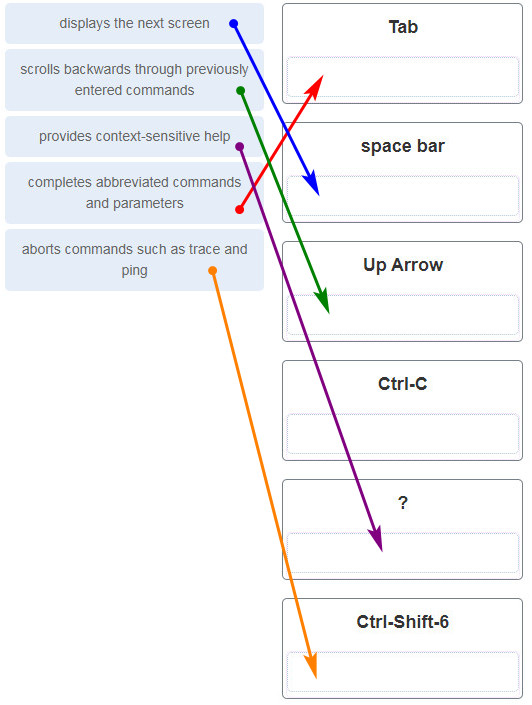
28. Match the definitions to their respective CLI hot keys and shortcuts. (Not all options are used.)


Explanation: The shortcuts with their functions are as follows:
– Tab – Completes the remainder of a partially typed command or keyword
– Space bar – displays the next screen
– ? – provides context-sensitive help
– Up Arrow – Allows user to scroll backward through former commands
– Ctrl-C – cancels any command currently being entered and returns directly to privileged EXEC mode
– Ctrl-Shift-6 – Allows the user to interrupt an IOS process such as ping or traceroute
29. In the show running-config command, which part of the syntax is represented by running-config?
  • the command
  • a keyword
  • a variable
  • a prompt
Explanation: The first part of the syntax, show, is the command, and the second part of the syntax, running-config, is the keyword. The keyword specifies what should be displayed as the output of the show command.
30. After making configuration changes on a Cisco switch, a network administrator issues a copy running-config startup-config command. What is the result of issuing this command?
  • The new configuration will be stored in flash memory.
  • The new configuration will be loaded if the switch is restarted.
  • The current IOS file will be replaced with the newly configured file.
  • The configuration changes will be removed and the original configuration will be restored.
31. What command will prevent all unencrypted passwords from displaying in plain text in a configuration file?
  • (config)# enable password secret
  • (config)# enable secret Secret_Password
  • (config-line)# password secret
  • (config)# service password-encryption
  • (config)# enable secret Encrypted_Password
Explanation: To prevent all configured passwords from appearing in plain text in configuration files, an administrator can execute the service password-encryption command. This command encrypts all configured passwords in the configuration file.

32. A network administrator enters the service password-encryption command into the configuration mode of a router. What does this command accomplish?
  • This command encrypts passwords as they are transmitted across serial WAN links.
  • This command prevents someone from viewing the running configuration passwords.
  • This command enables a strong encryption algorithm for the enable secret password command.
  • This command automatically encrypts passwords in configuration files that are currently stored in NVRAM.
  • This command provides an exclusive encrypted password for external service personnel who are required to do router maintenance.
Explanation: The startup-config and running-config files display most passwords in plaintext. Use the service password-encryption global config command to encrypt all plaintext passwords in these files.
33. What method can be used by two computers to ensure that packets are not dropped because too much data is being sent too quickly?
  • encapsulation
  • flow control
  • access method
  • response timeout
Explanation: In order for two computers to be able to communicate effectively, there must be a mechanism that allows both the source and destination to set the timing of the transmission and receipt of data. Flow control allows for this by ensuring that data is not sent too fast for it to be received properly.
34. Which statement accurately describes a TCP/IP encapsulation process when a PC is sending data to the network?
  • Data is sent from the internet layer to the network access layer.
  • Packets are sent from the network access layer to the transport layer.
  • Segments are sent from the transport layer to the internet layer.
  • Frames are sent from the network access layer to the internet layer.
Explanation: When the data is traveling from the PC to the network, the transport layer sends segments to the internet layer. The internet layer sends packets to the network access layer, which creates frames and then converts the frames to bits. The bits are released to the network media.
35. What three application layer protocols are part of the TCP/IP protocol suite? (Choose three.)
  • ARP
  • DHCP
  • DNS
  • FTP
  • NAT
  • PPP
Explanation: DNS, DHCP, and FTP are all application layer protocols in the TCP/IP protocol suite. ARP and PPP are network access layer protocols, and NAT is an internet layer protocol in the TCP/IP protocol suite.
36. Match the description to the organization. (Not all options are used.)

37. Which name is assigned to the transport layer PDU?
  • bits
  • data
  • frame
  • packet
  • segment
Explanation: Application data is passed down the protocol stack on its way to be transmitted across the network media. During the process, various protocols add information to it at each level. At each stage of the process, a PDU (protocol data unit) has a different name to reflect its new functions. The PDUs are named according to the protocols of the TCP/IP suite:
Data – The general term for the PDU used at the application layer.
Segment – transport layer PDU
Packet – network layer PDU
Frame – data link layer PDU
Bits – A physical layer PDU used when physically transmitting data over the medium
38. When IPv4 addressing is manually configured on a web server, which property of the IPv4 configuration identifies the network and host portion for an IPv4 address?
  • DNS server address
  • subnet mask
  • default gateway
  • DHCP server address
Explanation: There are several components that need to be entered when configuring IPv4 for an end device:
IPv4 address – uniquely identifies an end device on the network
Subnet mask – determines the network address portion and host portion for an IPv4 address
Default gateway – the IP address of the router interface used for communicating with hosts in another network
DNS server address – the IP address of the Domain Name System (DNS) server
DHCP server address (if DHCP is used) is not configured manually on end devices. It will be provided by a DHCP server when an end device requests an IP address.
39. What process involves placing one PDU inside of another PDU?
  • encapsulation
  • encoding
  • segmentation
  • flow control
Explanation: When a message is placed inside of another message, this is known as encapsulation. On networks, encapsulation takes place when one protocol data unit is carried inside of the data field of the next lower protocol data unit.
40. What layer is responsible for routing messages through an internetwork in the TCP/IP model?
  • internet
  • transport
  • network access
  • session
Explanation: The TCP/IP model consists of four layers: application, transport, internet, and network access. Of these four layers, it is the internet layer that is responsible for routing messages. The session layer is not part of the TCP/IP model but is rather part of the OSI model.
41. For the TCP/IP protocol suite, what is the correct order of events when a Telnet message is being prepared to be sent over the network?

CCNA-1-v7-Modules-1-3-Basic Network Connectivity and Communications Exam Answers 41
42. Which PDU format is used when bits are received from the network medium by the NIC of a host?
  • file
  • frame
  • packet
  • segment
Explanation: When received at the physical layer of a host, the bits are formatted into a frame at the data link layer. A packet is the PDU at the network layer. A segment is the PDU at the transport layer. A file is a data structure that may be used at the application layer.
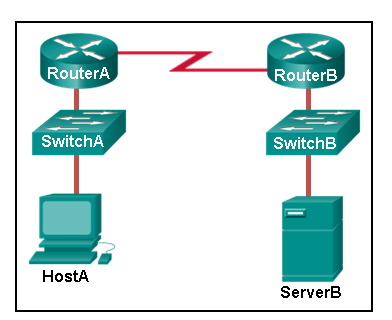
43. Refer to the exhibit. ServerB is attempting to contact HostA. Which two statements correctly identify the addressing that ServerB will generate in the process? (Choose two.)

  • ServerB will generate a packet with the destination IP address of RouterB.
  • ServerB will generate a frame with the destination MAC address of SwitchB.
  • ServerB will generate a packet with the destination IP address of RouterA.
  • ServerB will generate a frame with the destination MAC address of RouterB.
  • ServerB will generate a packet with the destination IP address of HostA.
  • ServerB will generate a frame with the destination MAC address of RouterA.
44. Which method allows a computer to react accordingly when it requests data from a server and the server takes too long to respond?
  • encapsulation
  • flow control
  • access method
  • response timeout
45. A web client is receiving a response for a web page from a web server. From the perspective of the client, what is the correct order of the protocol stack that is used to decode the received transmission?
  • Ethernet, IP, TCP, HTTP
  • HTTP, TCP, IP, Ethernet
  • Ethernet, TCP, IP, HTTP
  • HTTP, Ethernet, IP, TCP
Explanation:
1. HTTP governs the way that a web server and client interact.
2. TCP manages individual conversations between web servers and clients.
3. IP is responsible for delivery across the best path to the destination.
4. Ethernet takes the packet from IP and formats it for transmission.
46. Which two OSI model layers have the same functionality as a single layer of the TCP/IP model? (Choose two.)
  • data link
  • network
  • physical
  • session
  • transport
Explanation: The OSI data link and physical layers together are equivalent to the TCP/IP network access layer. The OSI transport layer is functionally equivalent to the TCP/IP transport layer, and the OSI network layer is equivalent to the TCP/IP internet layer. The OSI application, presentation, and session layers are functionally equivalent to the application layer within the TCP/IP model.

47. At which layer of the OSI model would a logical address be added during encapsulation?
  • physical layer
  • data link layer
  • network layer
  • transport layer
48. What is a characteristic of multicast messages?
  • They are sent to a select group of hosts.
  • They are sent to all hosts on a network.
  • They must be acknowledged.
  • They are sent to a single destination.
Explanation: Multicast is a one-to-many type of communication. Multicast messages are addressed to a specific multicast group.
49. Which statement is correct about network protocols?
  • Network protocols define the type of hardware that is used and how it is mounted in racks.
  • They define how messages are exchanged between the source and the destination.
  • They all function in the network access layer of TCP/IP.
  • They are only required for exchange of messages between devices on remote networks.
50. What is an advantage of network devices using open standard protocols?
  • Network communications is confined to data transfers between devices from the same vendor.
  • A client host and a server running different operating systems can successfully exchange data.
  • Internet access can be controlled by a single ISP in each market.
  • Competition and innovation are limited to specific types of products.
Explanation: An advantage of network devices implementing open standard protocols, such as from the TCP/IP suite, is that clients and servers running different operating systems can communicate with each other. Open standard protocols facilitate innovation and competition between vendors and across markets, and can reduce the occurrence of monopolies in networking markets.

51. Which device performs the function of determining the path that messages should take through internetworks?
  • a router
  • a firewall
  • a web server
  • a DSL modem
Explanation: A router is used to determine the path that the messages should take through the network. A firewall is used to filter incoming and outgoing traffic. A DSL modem is used to provide Internet connection for a home or an organization.
52. Open the PT Activity. Perform the tasks in the activity instructions and then answer the question.

CCNA-1-v7-Modules-1-3-Basic Network Connectivity and Communications Exam Answers 52
What is the IP address of the switch virtual interface (SVI) on Switch0?
  • 192.168.5.10
  • 192.168.10.5
  • 192.168.10.1
  • 192.168.5.0
Explanation: After the enable command is issued, the show running-configuration command or the show ip interfaces brief command will display the IP address of the switch virtual interface (SVI).
53. Why would a Layer 2 switch need an IP address?
  • to enable the switch to send broadcast frames to attached PCs
  • to enable the switch to function as a default gateway
  • to enable the switch to be managed remotely
  • to enable the switch to receive frames from attached PCs
Explanation: A switch, as a Layer 2 device, does not need an IP address to transmit frames to attached devices. However, when a switch is accessed remotely through the network, it must have a Layer 3 address. The IP address must be applied to a virtual interface rather than to a physical interface. Routers, not switches, function as default gateways.
54. Refer to the exhibit. An administrator is trying to configure the switch but receives the error message that is displayed in the exhibit. What is the problem?

CCNA-1-v7-Modules-1-3-Basic Network Connectivity and Communications Exam Answers 54
  • The entire command, configure terminal, must be used.
  • The administrator is already in global configuration mode.
  • The administrator must first enter privileged EXEC mode before issuing the command.
  • The administrator must connect via the console port to access global configuration mode.
Explanation: In order to enter global configuration mode, the command configure terminal, or a shortened version such as config t, must be entered from privileged EXEC mode. In this scenario the administrator is in user EXEC mode, as indicated by the > symbol after the hostname. The administrator would need to use the enable command to move into privileged EXEC mode before entering the configure terminal command.
55. What term describes a network owned by one organization that provides safe and secure access to individuals who work for a different organization?
  • extranet
  • cloud
  • BYOD
  • quality of service
56. What term describes storing personal files on servers over the internet to provide access anywhere, anytime, and on any device?
  • cloud
  • BYOD
  • quality of service
  • converged network
57. What term describes a network where one computer can be both client and server?
  • peer-to-peer
  • cloud
  • BYOD
  • quality of service
58. What term describes a type of network used by people who work from home or from a small remote office?
  • SOHO network
  • BYOD
  • quality of service
  • converged network
59. What term describes a computing model where server software runs on dedicated computers?
  • client/server
  • internet
  • intranet
  • extranet
60. What term describes a type of network used by people who work from home or from a small remote office?
  • SOHO network
  • internet
  • intranet
  • extranet
61. What term describes a technology that allows devices to connect to the LAN using an electrical outlet?
  • powerline networking
  • internet
  • intranet
  • extranet
62. What term describes a policy that allows network devices to manage the flow of data to give priority to voice and video?
  • quality of service
  • internet
  • intranet
  • extranet
63. What term describes a private collection of LANs and WANs that belongs to an organization?
  • intranet
  • internet
  • extranet
  • peer-to-peer
64. What term describes the ability to use personal devices across a business or campus network?
  • BYOD
  • internet
  • intranet
  • extranet
65. At which OSI layer is a source IP address added to a PDU during the encapsulation process?
  • network layer
  • data link layer
  • transport layer
  • application layer
66. At which OSI layer is a destination port number added to a PDU during the encapsulation process?
  • transport layer
  • data link layer
  • network layer
  • application layer
67. At which OSI layer is data added to a PDU during the encapsulation process?
  • application layer
  • data link layer
  • network layer
  • transport layer
68. At which OSI layer is a source IP address added to a PDU during the encapsulation process?
  • network layer
  • data link layer
  • application layer
  • presentation layer
69. At which OSI layer is data added to a PDU during the encapsulation process?
  • application layer
  • transport layer
  • network layer
  • presentation layer
70. At which OSI layer is a destination IP address added to a PDU during the encapsulation process?
  • network layer
  • application layer
  • transport layer
  • presentation layer
71. At which OSI layer is a source MAC address added to a PDU during the encapsulation process?
  • data link layer
  • application layer
  • transport layer
  • presentation layer
72. At which OSI layer is a source port number added to a PDU during the encapsulation process?
  • transport layer
  • application layer
  • network layer
  • presentation layer
73. At which OSI layer is a destination MAC address added to a PDU during the encapsulation process?
  • data link layer
  • transport layer
  • application layer
  • network layer
74. At which OSI layer is a source port number added to a PDU during the encapsulation process?
  • transport layer
  • network layer
  • application layer
  • data link layer

Routage Statique


Routage statique ou dynamique?

Pour le routage statique, les tables sont remplies manuellement. Il est utilisé sur des petits réseaux ou sur des réseaux d'extrémité. Avec le routage dynamique, les tables sont remplies automatiquement. On configure un protocole qui va se charger d'établir la topologie et de remplir les tables de routage. On utilise un protocole de routage dynamique sur des réseaux plus importants. Le routage dynamique permet également une modification automatique des tables de routage en cas de rupture d'un lien sur un routeur. Il permet également de choisir la meilleure route disponible pour aller d'un réseau à un autre.
Exemple de protocole de routage : BGP (utilisé sur l'Internet), RIP, OSPF, IS-IS

Rappel: Configuration d'une route par défaut

La passerelle par défaut dans l'exemple suivant est : 192.168.3.1
R4(config)#ip route 0.0.0.0 0.0.0.0 192.168.3.1

Suppression de la route par défaut

R4(config)#no ip route 0.0.0.0 0.0.0.0 192.168.3.1

Configuration d'une route statique

Dans la commande suivante, le réseau à atteindre est le réseau 192.168.2.0/24 et l'interface utilisée pour joindre le réseau est ethernet 1/0.
On peut aussi utiliser l'adresse IP du prochain routeur.
R4(config)#ip route 192.168.2.0 255.255.255.0 ethernet 1/0
R4(config)#
Autre possibilité:
R4(config)#ip route 192.168.2.0 255.255.255.0 10.0.0.2
R4(config)#

Suppression de la route statique

R4(config)#no ip route 192.168.2.0 255.255.255.0 ethernet 1/0
R4(config)#

Affichage de la table de routage

R4#show ip route
Codes: C - connected, S - static, R - RIP, M - mobile, B - BGP
D - EIGRP, EX - EIGRP external, O - OSPF, IA - OSPF inter area
N1 - OSPF NSSA external type 1, N2 - OSPF NSSA external type 2
E1 - OSPF external type 1, E2 - OSPF external type 2
i - IS-IS, su - IS-IS summary, L1 - IS-IS level-1, L2 - IS-IS level-2
ia - IS-IS inter area, * - candidate default, U - per-user static route
o - ODR, P - periodic downloaded static route

Gateway of last resort is 192.168.3.1 to network 0.0.0.0

10.0.0.0/24 is subnetted, 1 subnets
C 10.0.0.0 is directly connected, Ethernet1/0
S 192.168.2.0/24 [1/0] via 10.0.0.2
C 192.168.3.0/24 is directly connected, FastEthernet2/0
S* 0.0.0.0/0 [1/0] via 192.168.3.1
R4#
On remarque sur cette sortie de commande les réseaux directement connectés (C), les routes statiques (s) et la route par défaut.

Exemple de configuration


Extrait du fichier de configuration de R4 et R5

R4#sh run
Building configuration...

interface Ethernet1/0
ip address 10.0.0.1 255.255.255.0
duplex half
!
interface FastEthernet2/0
ip address 192.168.3.2 255.255.255.0
duplex auto
speed auto
!
ip route 0.0.0.0 0.0.0.0 192.168.3.1
ip route 192.168.2.0 255.255.255.0 10.0.0.2

R5#sh run
Building configuration...

interface Ethernet1/0
ip address 10.0.0.2 255.255.255.0
duplex half

interface FastEthernet2/0
ip address 192.168.2.1 255.255.255.0
duplex auto
speed auto
!
ip route 0.0.0.0 0.0.0.0 10.0.0.1

Affichage des tables de routage

R4#show ip route
Codes: C - connected, S - static, R - RIP, M - mobile, B - BGP
D - EIGRP, EX - EIGRP external, O - OSPF, IA - OSPF inter area
N1 - OSPF NSSA external type 1, N2 - OSPF NSSA external type 2
E1 - OSPF external type 1, E2 - OSPF external type 2
i - IS-IS, su - IS-IS summary, L1 - IS-IS level-1, L2 - IS-IS level-2
ia - IS-IS inter area, * - candidate default, U - per-user static route
o - ODR, P - periodic downloaded static route

Gateway of last resort is 192.168.3.1 to network 0.0.0.0

10.0.0.0/24 is subnetted, 1 subnets
C 10.0.0.0 is directly connected, Ethernet1/0
S 192.168.2.0/24 [1/0] via 10.0.0.2
C 192.168.3.0/24 is directly connected, FastEthernet2/0
S* 0.0.0.0/0 [1/0] via 192.168.3.1
R4#
R5(config)#do show ip route
Codes: C - connected, S - static, R - RIP, M - mobile, B - BGP
D - EIGRP, EX - EIGRP external, O - OSPF, IA - OSPF inter area
N1 - OSPF NSSA external type 1, N2 - OSPF NSSA external type 2
E1 - OSPF external type 1, E2 - OSPF external type 2
i - IS-IS, su - IS-IS summary, L1 - IS-IS level-1, L2 - IS-IS level-2
ia - IS-IS inter area, * - candidate default, U - per-user static route
o - ODR, P - periodic downloaded static route

Gateway of last resort is 10.0.0.1 to network 0.0.0.0

10.0.0.0/24 is subnetted, 1 subnets
C 10.0.0.0 is directly connected, Ethernet1/0
C 192.168.2.0/24 is directly connected, FastEthernet2/0
S* 0.0.0.0/0 [1/0] via 10.0.0.1
R5(config)#

Configuration de la qos pour la voip

Configuration automatique de la qos dédiée à la voip.
Les commandes suivantes ont été testées sur des switchs série 2950, 2960 et 3750.


Des commandes permettent de configurer la qualité de service automatiquement pour les ports d'accès (sur lesquels sont reliés les téléphones) et pour les ports d'uplink (liaison entre les switches).

Activation de la qos pour les switchs séries 3750 et 2960

Port d'accès:
3750(config)#int fastEthernet 0/1
3750(config-if)#auto qos voip cisco-phone
3750(config-if)#end

Affichage de la configuration du port (les commandes de qualité de service ont été ajoutées):
3750#sh run int fastEthernet 1/0/1
Building configuration...

Current configuration : 295 bytes
!
interface FastEthernet1/0/1
switchport access vlan 4
switchport mode access
switchport voice vlan 10
srr-queue bandwidth share 10 10 60 20
srr-queue bandwidth shape 10 0 0 0
mls qos trust device cisco-phone
mls qos trust cos
auto qos voip cisco-phone
spanning-tree portfast
end

Port de liaison, trunk ou uplink, switch série 2960 et 3750
3750(config)#int gi 0/1
3750(config-if)#auto qos voip trust
3750(config-if)#end

Activation de la qualité de service pour un port uplink série 6500


Activation générale
6500(config)#mls qos
Activation pour un port uplink (concerne la qos appliquée sur le niveau 2)
6500(config)#int gi 0/1
6500(config-if)#mls qos trust cos

Configuration du protocole ssh

Quel protocole choisir pour l'administration du switch, configuration du protocole ssh.
Les commandes suivantes ont été testées sur des switchs série 3750 et 2960.

Quel protocole d'administration à distance choisir?

En général, il y a le choix entre l'administration web sécurisée ou pas (protocole http ou https) et/ou l'administration en ligne de commande sécurisée ou pas (telnet ou ssh).
L'administration du switch en utilisant une interface web peut être pratique. Mais nous choisirons en priorité l'administration du switch en utilisant la ligne de commande pour les raisons suivantes:
  • En cas de coupure réseau, il nous faudra intervenir directement sur le switch, donc autant être habitué à travailler en ligne de commande,
  • L'interface web peut être moins stable que l'interface en ligne de commande (CLI),
  • Les configurations avancées sont souvent disponibles uniquement au travers de la ligne de commande,
  • Je vous laisse trouver d'autres arguments...

Pour avoir un compte rendu graphique des objets du switch, nous nous tournerons vers une solution de supervision du réseau qui allie les avantages de la ligne de commande à une présentation graphique des objets du réseau. En général, ces logiciels fonctionnent grace au protole SNMP.

Ainsi (revenons au sujet) les interfaces web seront désactivées.
Il nous reste à choisir entre telnet et ssh. Le second étant nettement plus sécurisé que le premier, il est préférable (quand cela est possible) d'activer uniquement ssh sur le switch.

Activation / désactivation des interfaces d'administration web

Les commandes suivantes active puis désactive l'administration web non sécurisée et sécurisée.
2960-RG(config)#ip http server
2960-RG(config)#ip http secure-server
2960-RG(config)#no ip http server
2960-RG(config)#no ip http secure-server

Configuration du protocole ssh pour le switch

  • Vérification de la prise en compte du protocole ssh par l'IOS
  • Tout d'abord, il faut vérifier que l'IOS du switch supporte ssh. La mention k9 (crypto) doit figurer dans le nom de l'IOS.
    La commande pour vérifier la version de l'IOS est:
    2960-RG#show version
    Cisco IOS Software, C2960 Software (C2960-LANBASEK9-M), Version 12.2(55)SE, RELEASE SOFTWARE (fc2)
    Technical Support: http://www.cisco.com/techsupport
    Copyright (c) 1986-2010 by Cisco Systems, Inc.
    Compiled Sat 07-Aug-10 23:04 by prod_rel_team
  • Configuration du nom d'hote et du nom de domaine.
  • Le nom du switch ainsi que le nom de domaine doivent avoir été configurés.
  • Création de la clé
  • 2960-RG(config)#crypto key generate rsa general-keys modulus 1024
    The name for the keys will be: 2960-RG.mondomaine.fr
    % The key modulus size is 1024 bits
    % Generating 1024 bit RSA keys, keys will be non-exportable...[OK]

    2960-RG(config)#
    *Mar 1 00:42:43.625: %SSH-5-ENABLED: SSH 1.99 has been enabled
  • Activation de ssh

  • 2960-RG(config)#ip ssh version 2
  • Options ajoutées au service ssh
  • - les évènements associés aux connexions ssh sont enregistrés.
    - Un timeout de 60 secondes est ajouté pour les sessions ssh en cas d'inactivité .
    - Nous laissons trois essais pour la connexion au switch.

    clem(config)#ip ssh logging events
    clem(config)#ip ssh time-out 60
    clem(config)#ip ssh authentication-retries 3
  • Configuration de l'authentification et ajout d'un compte administrateur
  • clem(config)#aaa new-model
    clem(config)#aaa authentication login default local
    clem(config)#username admin secret P@55w0rd
  • Désactivation de telnet pour l'accès au switch
  • clem(config)#line vty 0 15
    clem(config-line)#login local
    clem(config-line)#transport input ssh
  • Vérification de la configuration
  • 2960-RG#show ip ssh
    SSH Enabled - version 2.0
    Authentication timeout: 60 secs; Authentication retries: 3
SSH est maintenant activé. nous pouvons accéder au switch avec un client ssh (par exemple putty pour windows).

Suppression de ssh

La suppression de la clé entraine la désactivation de ssh.
2960-RG(config)#crypto key zeroize rsa
% All RSA keys will be removed.
% All router certs issued using these keys will also be removed.
Do you really want to remove these keys? [yes/no]: yes
2960-RG(config)#
Vérification:
2960-RG#sh ip ssh
SSH Disabled - version 2.0
%Please create RSA keys to enable SSH (of atleast 768 bits size) to enable SSH v2.
Authentication timeout: 60 secs; Authentication retries: 3

Filtrer les connexions ssh avec une liste de contrôle d'accès

La liste de contrôle d'accès va nous permettre de filtrer l'accès ssh en utilisant l'adresse IP source.
Dans la commande suivante, la liste de controle d’accès a le numéro 10 et le réseau autorisé à se connecter en ssh est 192.168.100.0/24.
Switch(config)#access-list 10 permit 192.168.100.0 0.0.0.255
Ensuite, on autorise la connection exclusive de ce réseau sur les terminaux virtuel avec la commande access-class:

Switch(config)#line vty 0 15
Switch(config-line)#access-class 10 in
Switch(config-line)#

Commande de diagnostique sur des routeurs Cisco

Ces commandes permettent d'afficher les voisins, d'afficher différentes statistiques, de faire un ping vers une interface ou encore de vérifier l'état des processus.

Activer/désactiver les notifications (par défaut en mode console)

R2#terminal monitor
R2#
R2#terminal no monitor
R2#

Comment afficher les voisins?

Il peut être utile d'afficher les voisins (en général d'autre routeur relié). Cisco utilise le protocole CDP (cisco discovery protocol) pour afficher les informations sur les voisins. Il faut donc pour que la commande fonctionne que le protocole cdp soit activé sur les routeurs.
La commande suivante active le protocole cdp puis affiche les voisins.
R2(config)#cdp run
R2(config)#exit
R2#show cdp neighbors
Capability Codes: R - Router, T - Trans Bridge, B - Source Route Bridge
S - Switch, H - Host, I - IGMP, r - Repeater

Device ID Local Intrfce Holdtme Capability Platform Port ID
R1 Eth 1/0 125 R 7206VXR Eth 1/0
R2#

Il est aussi possible d'afficher les détails sur le voisin, notamment l'adresse IP et le modèle de ce dernier en filtrant sur un port ou sur le nom d'un voisin.
R2#show cdp neighbors ethernet 1/0 detail
-------------------------
Device ID: R1
Entry address(es):
IP address: 192.168.100.1
Platform: Cisco 7206VXR, Capabilities: Router
Interface: Ethernet1/0, Port ID (outgoing port): Ethernet1/0
Holdtime : 124 sec

Version :
Cisco IOS Software, 7200 Software (C7200-IPBASEK9-M), Version 12.4(22)T, RELEASE SOFTWARE (fc1)
Technical Support: http://www.cisco.com/techsupport
Copyright (c) 1986-2008 by Cisco Systems, Inc.
Compiled Fri 10-Oct-08 10:10 by prod_rel_team

advertisement version: 2
Duplex: half

R2#
R2#
R2#
R2#show cdp entry R1
-------------------------
Device ID: R1
Entry address(es):
IP address: 192.168.100.1
Platform: Cisco 7206VXR, Capabilities: Router
Interface: Ethernet1/0, Port ID (outgoing port): Ethernet1/0
Holdtime : 173 sec
Pour des raisons de sécurité, certain préfère désactiver le protocole.
R1(config)#no cdp run
R1(config)#end
R1#
R1#sh cdp neighbors
% CDP is not enabled
R1#

Sans commentaire

R2#ping
Protocol [ip]:
Target IP address: 192.168.1.1
Repeat count [5]:
Datagram size [100]:
Timeout in seconds [2]:
Extended commands [n]:
Sweep range of sizes [n]:
Type escape sequence to abort.
Sending 5, 100-byte ICMP Echos to 192.168.100.1, timeout is 2 seconds:
!!!!!
Success rate is 100 percent (5/5), round-trip min/avg/max = 1/1/1 ms
R2#

Affichage de l'inventaire du matériel

R1#show inventory
NAME: "Chassis", DESCR: "Cisco 7206VXR, 6-slot chassis"
PID: CISCO7206VXR , VID: , SN: 4279256517

NAME: "NPE400 0", DESCR: "Cisco 7200VXR Network Processing Engine NPE-400"
PID: NPE-400 , VID: , SN: 11111111

NAME: "module 0", DESCR: "I/O FastEthernet (TX-ISL)"
PID: C7200-IO-FE-MII/RJ45=, VID: , SN: 4294967295

Affichage de l'utilisation de la mémoire et du processeur

R1#show processes memory
Processor Pool Total: 150516196 Used: 23573320 Free: 126942876
I/O Pool Total: 16777216 Used: 2737120 Free: 14040096
Transient Pool Total: 16777216 Used: 21636 Free: 16755580

PID TTY Allocated Freed Holding Getbufs Retbufs Process
0 0 39544288 16210268 20763096 0 0 *Init*
0 0 12052 73028 12052 0 0 *Sched*
0 0 22660 317548 412 183104 183104 *Dead*
R1#
R1#
R1#show processes cpu
CPU utilization for five seconds: 1%/100%; one minute: 1%; five minutes: 1%
PID Runtime(ms) Invoked uSecs 5Sec 1Min 5Min TTY Process
1 12 64 187 0.00% 0.00% 0.00% 0 Chunk Manager
2 0 240 0 0.00% 0.00% 0.00% 0 Load Meter
3 5280 445 11865 0.23% 0.25% 0.22% 0 Exec
4 0 1 0 0.00% 0.00% 0.00% 0 EDDRI_MAIN
5 800 145 5517 0.00% 0.06% 0.05% 0 Check heaps
6 0 1 0 0.00% 0.00% 0.00% 0 Pool Manager
7 0 2 0 0.00% 0.00% 0.00% 0 Timers

Affichage de l'état des interfaces

R1#show interfaces
FastEthernet0/0 is down, line protocol is down
Hardware is DEC21140, address is ca03.0bc0.0000 (bia ca03.0bc0.0000)
MTU 1500 bytes, BW 100000 Kbit/sec, DLY 100 usec,
reliability 255/255, txload 1/255, rxload 1/255
Encapsulation ARPA, loopback not set
Keepalive set (10 sec)
Half-duplex, 100Mb/s, 100BaseTX/FX
Il est possible d'afficher l'état d'une interface en particulier en faisant suivre la commande du numéro de l'interface (R1#show interfaces ethernet 1/0).

Affichage des statistiques pour les interfaces

R1#show interfaces stats
FastEthernet0/0
Switching path Pkts In Chars In Pkts Out Chars Out
Processor 0 0 0 0
Route cache 0 0 0 0
Total 0 0 0 0
Ethernet1/0
Switching path Pkts In Chars In Pkts Out Chars Out
Processor 39 9346 165 17188
Route cache 0 0 0 0
Total 39 9346 165 17188

Mise à zéro des compteurs pour les interfaces

R1#clear counters
Clear "show interface" counters on all interfaces [confirm]
R1#

Affichage de la température et de l'état des alimentations électriques

R1#show environment all
Power Supplies:
Power Supply 1 is AC Power Supply. Unit is on.
Power Supply 2 is AC Power Supply. Unit is on.

Temperature readings:
I/O Cont Inlet measured at 22C/71F
I/O Cont Outlet measured at 22C/71F
NPE Inlet measured at 22C/71F
NPE Outlet measured at 22C/71F

Fourniture d'un rapport complet sur le routeur (ça peut être long ...)

R1#show tech-support

Affichage des statistiques IP

R1#sh ip traffic
IP statistics:
Rcvd: 14 total, 14 local destination
0 format errors, 0 checksum errors, 0 bad hop count
0 unknown protocol, 0 not a gateway
0 security failures, 0 bad options, 0 with options
Opts: 0 end, 0 nop, 0 basic security, 0 loose source route

Afficher les protocoles configurés

R1#show protocols
Global values:
Internet Protocol routing is enabled
FastEthernet0/0 is up, line protocol is up
Internet address is 192.168.0.1/24
Serial0/0 is administratively down, line protocol is down
FastEthernet0/1 is up, line protocol is up
Internet address is 192.168.100.1/24
Serial0/1 is administratively down, line protocol is down

Afficher l'état des protocoles de routage actif

R1#sh ip protocols
Routing Protocol is "ospf 100"
Outgoing update filter list for all interfaces is not set
Incoming update filter list for all interfaces is not set
Router ID 172.16.0.1
Number of areas in this router is 1. 1 normal 0 stub 0 nssa
Maximum path: 4
Routing for Networks:
10.0.0.0 0.0.0.255 area 0
10.0.3.0 0.0.0.255 area 0
Reference bandwidth unit is 100 mbps
Routing Information Sources:
Gateway Distance Last Update
172.16.0.2 110 00:04:42
172.16.0.3 110 00:04:42
Distance: (default is 110)

Configuration de l'accès aux services syslog, NTP et SNMP

Configuration de l'accès aux services syslog, NTP et SNMP.

Commande pour afficher les logs

routeur-cisco#show logging
Syslog logging: enabled (0 messages dropped, 0 messages rate-limited,
0 flushes, 0 overruns, xml disabled, filtering disabled)

No Active Message Discriminator.

Configuration du service syslog

Le pré-requis est d'avoir installé un serveur type syslog (adresse 192.168.0.123 dans l'exemple).

Configuration du niveau d'information demandé: dans l'exemple, on demande le maximum d'information.
routeur-cisco(config)#logging trap ?
<0-7> Logging severity level
alerts Immediate action needed (severity=1)
critical Critical conditions (severity=2)
debugging Debugging messages (severity=7)
emergencies System is unusable (severity=0)
errors Error conditions (severity=3)
informational Informational messages (severity=6)
notifications Normal but significant conditions (severity=5)
warnings Warning conditions (severity=4)


routeur-cisco(config)#logging trap debugging
routeur-cisco(config)#

Puis on configure l'étiquette associée à chaque message (ici local4),l'adresse IP du serveur syslog et on active.
routeur-cisco(config)#logging facility local4
routeur-cisco(config)#logging 192.168.0.123
routeur-cisco(config)#logging on
routeur-cisco(config)#

Configuration du service NTP

Synchronisons maintenant les informations horaires du switch à un serveur NTP (network time protocol).
Nous indiquons dans un premier temps l'adresse IP du serveur NTP, puis on configure le fuseau horaire ainsi que le moment de passer à l'heure d'été (dans l'exemple: pour la France).
routeur-cisco(config)#ntp server 192.168.0.124
routeur-cisco(config)#clock timezone cet 1
routeur-cisco(config)#clock summer-time cest recurring last Sun Mar 3:00 last Sun Oct 3:00

Quelques commandes de vérification: les associations avec le serveur ntp et l'affichage de la date et de l'heure courante:
routeur-cisco#show ntp associations

address ref clock st when poll reach delay offset disp
~192.168.0.124 .INIT. 16 - 64 0 0.000 0.000 15937.
* sys.peer, # selected, + candidate, - outlyer, x falseticker, ~ configured
routeur-cisco#
routeur-cisco#show clock
*22:39:31.771 cest Fri Jul 29 2011
routeur-cisco#show ntp status

Configuration du service SNMP

Voyons maintenant comment configurer l'accès du routeur à un serveur de supervision basé sur le protocole SNMP.

Nous configurons tout d'abord une liste d'accès pour autoriser uniquement la connexion du serveur de management SNMP, puis nous indiquons le nom de la communauté SNMP ainsi que les droits associés (lecture (ro) ou lecture/écriture (rw)).
routeur-cisco(config)#access-list 10 permit 192.168.1.2
routeur-cisco(config)#snmp-server community macomm ro 10
routeur-cisco(config)#exit
routeur-cisco#show snmp community